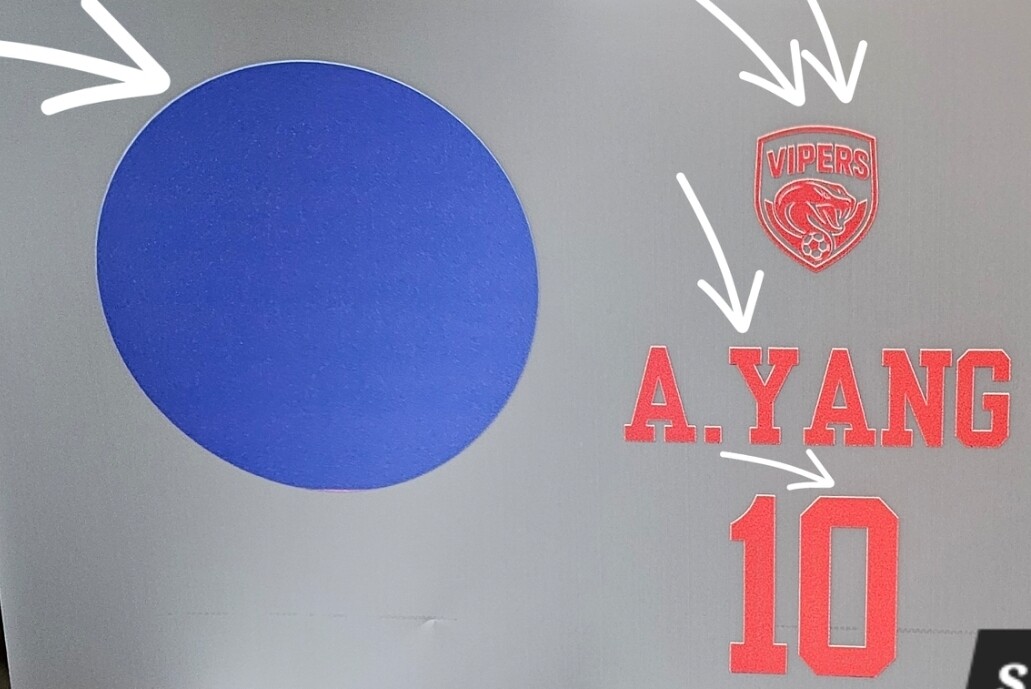
I have an ongoing issue regarding white ink misalignment on all my prints.
Despite spending 3 hours on a support call last week and following the instructions provided, the issue remains unresolved. I have tried adjusting the step count settings and the shrink percentage, but neither has corrected the misalignment. I was previously advised to print images as they are while waiting for further instructions after support consults with overseas support, but I have not yet received an update.
Is there a way to perform a factory reset to restore all settings within the app? Additionally, if you have any other insights into what might be causing this persistent misalignment, please let me know.
Hi @jennycreates. Can you tell us which printer you have? The D1 or the D2?
Also, what do you mean by “white ink misalignment?” Is the white layer shifted away from the color layer, or is the white just printing wrong? Can you provide us with a short video or at least an image of this problem? It will help us to better understand what you’re talking about.
Ok, thanks so much for the image and clarifying which machine you have.
Just to clarify — this group is a public community of users, not the official HTVRONT support team. Everyone here is just sharing personal experience with the machines they own, so we don’t have access to the tools or information that support does.
I don’t think there’s a reset on the D1 that will correct white‑layer alignment, so not sure if there’s anything on the user side that’s going to resolve it.
Since support already told you to continue printing as‑is while they wait for feedback from the overseas technicians, that’s the best direction to follow for now. They’re the ones who can give you the updated settings or fixes for this type of issue. If you haven’t heard back yet, it’s completely okay to reply in your existing ticket/email and ask if there are any updates — that helps keep your case active so you’ll get the next instructions as soon as they have them.
If you purchased your D1 less than a year ago, it is still under warranty, so if it is determined that it can’t be fixed by the user, they will more than likely replace the printer or offer to fix it themselves.
Totally get it — sometimes people do run into similar issues. But if support has already gone through everything with you and is still waiting on guidance, anyone here would probably be in the same boat you are.
Hello Jenny, You could also check this discussion in the community and see if anything there feels relevant to your case, hope it helps a little while waiting for further updates from support:
Thanks, Olivia. Maybe this information needs to be passed on to support, as it looks like it helped the other user. I figured that after a 3 hour call with support, and them saying they would need to reach out to overseas support, that all options would’ve been exhausted.