Come See Our New View | Enjoy visual posts and a smarter navigation!

Hey friends!

So, you know when you’re scrolling through our community page and thinking, “Hmm, I wish I could actually see those awesome project photos instead of just reading about them?” Well, guess what? We heard from you!

We’ve just given our community page a fresh new look—cleaner, smoother, and way more fun to explore. Here’s the lowdown on what’s new:

1. Posts Now Show Off Those Beautiful Pics (Finally!)

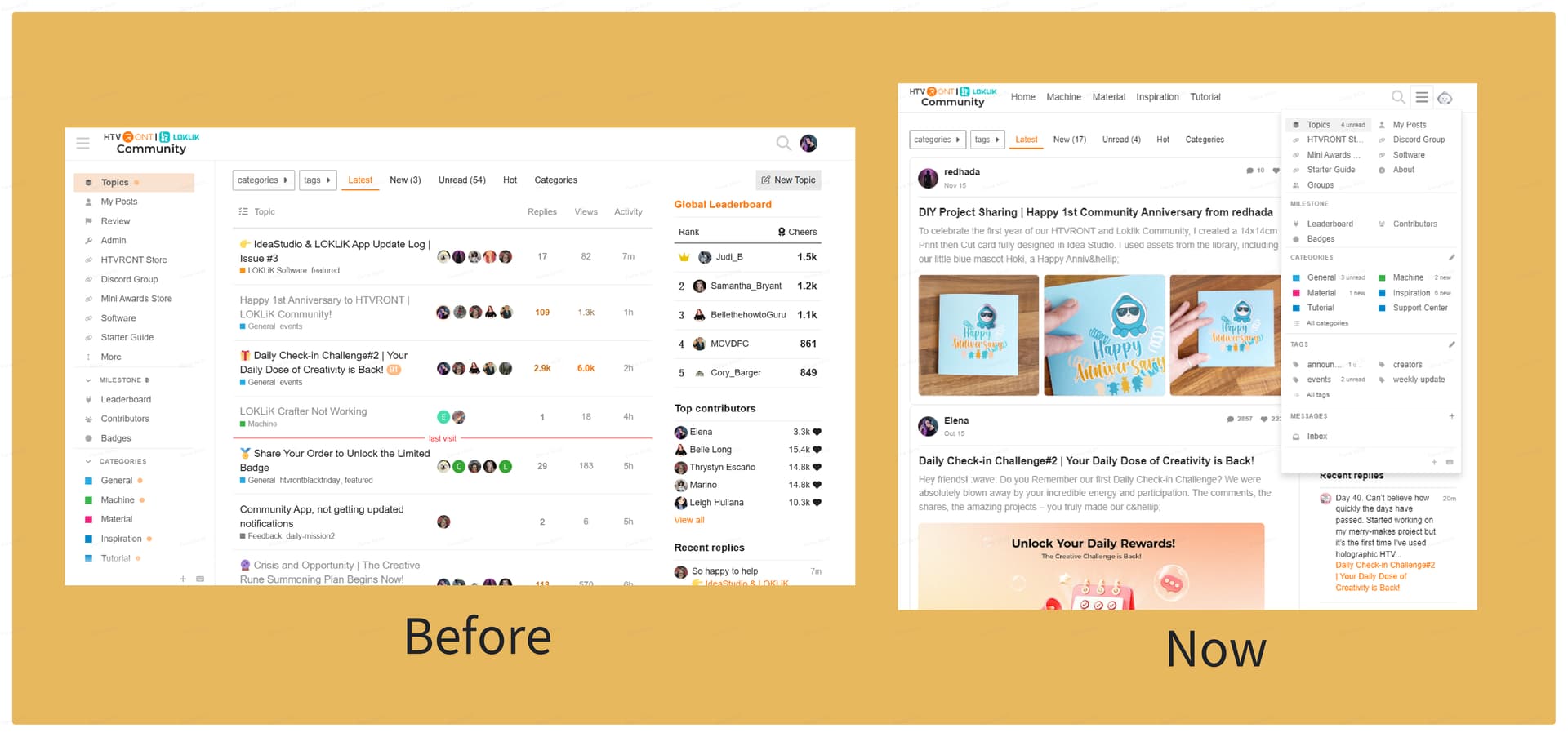
Yep, you read that right. No more boring walls of text! When you or your fellow crafters share a project in the community, you’ll actually see the photos right there on the Web Version as well. Get ready to be inspired by all the eye-catching DIYs, vinyl creations, and glittery masterpieces. Show off your work—you’ve earned it!

2. Everything’s Easier to Find with Our New Navigation

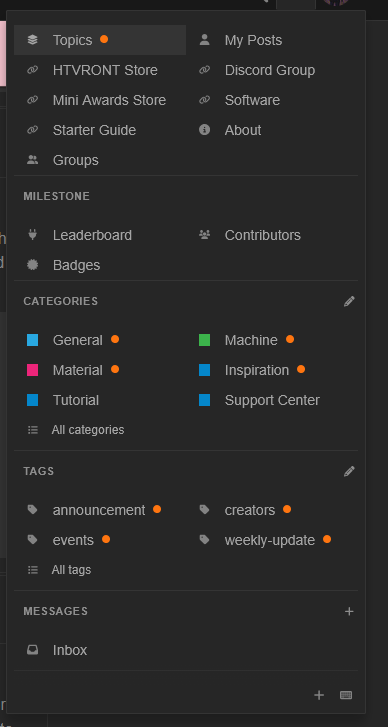
We moved the main menu from the left side up to the top (it’s tidier that way). It’s tucked away by default, but just hit that menu button and poof—everything pops up!

Plus, we added quick-access tabs so you can jump straight to what matters most: machines, materials, DIY projects… you name it. No more endless scrolling, just tap and go.
So why the glow-up? Simple: we want to make your experience better. Whether you’re looking for inspiration, troubleshooting a machine, or just sharing your latest creation, we’re making it easier and faster for you to connect and create.

Go check it out, post your latest project, and let us know what you think! We’re all ears.

Happy crafting!

13 Likes

That’s a nice update. It’s good to see images of the posts :smiling_face_with_three_hearts:

7 Likes

That´s really a big change. It looks very pretty. Let’s see if it is really comfortable too!

Ohh there’re more changes! I see the new menu now! :open_mouth:

8 Likes

A nice update it looks good thank you :smiling_face:

5 Likes

WOW!! Very cool update!

6 Likes

My brain is currently trying to get used to changes.

6 Likes

To me, it’s too wide for mobile viewing. I have to swipe left to see the notification bar. It’s fine if I turn my phone to landscape orientation, but in portrait orientation, which I prefer, it’s kind of inconvenient. I like the new homepage look, though. The photos look good, the ones that do show up. I have 2 projects I posted last night that have just a speech bubble as the cover images, but the jar I posted earlier today shows the images. Idk if it’s because I shared the jar as a topic here on the HTVRONT mobile website and the others from the community section of the IS app or what, but that’s the only thing I did differently. And when I save a canvas project and share it publicly on the IS app, it doesn’t show up at all over here, unlike before. When I copy the links to these projects to add them to an event, it just displays the link rather than displaying a project preview for the link, as it did before.

6 Likes

On iPad it’s still a bit distracting I had to take a few hours to mentally prepare to come back in lol.

5 Likes

Looks Fabulous @Elena having fun looking around!! :star_struck:

5 Likes

this was my peg for the website

5 Likes

The website has encountered some bugs, causing the system to miss message notifications and project synchronization issues. This has been reported to the engineers, who are working on fixing it as soon as possible. In the meantime, you can publish your project in ideaStudio. Even if it doesn’t sync to the community, it will still count as a project participating in the event, so no need to worry :smiling_face_with_three_hearts:

6 Likes

Ok, awesome! Thanks so much for the information. :smiling_face_with_three_hearts: I see I don’t have to swipe left to see the notifications anymore. That’s fantastic. That was the only thing I didn’t like about the new update. Mobile view looks great, now. :heart:

5 Likes