Are there more fonts I can access? The same old ones are boring and there’s quite a few not even on the list. How do I get more fonts?
4 Likes
Hi, @Candace_Wilkerson 
 . If you’re using a PC, you can go to 1001Fonts.com, FontSpace.com, or dafont.com, and download free fonts. You can filter for commercial free licensed fonts. Once downloaded, open the file, then open the OpenType font package — if available, if not, choose the True Type font —click install when the font preview opens. Once you’ve downloaded and installed all the fonts you want, you will need to restart the software, then you’ll find your new fonts in the System Fonts section.
I’ve not found a way to install fonts on mobile, as my Samsung will only let me download fonts from the Samsung store, and they won’t install to the Loklik app.
Hope this helps. Have a wonderful day.  Happy New Year!
3 Likes
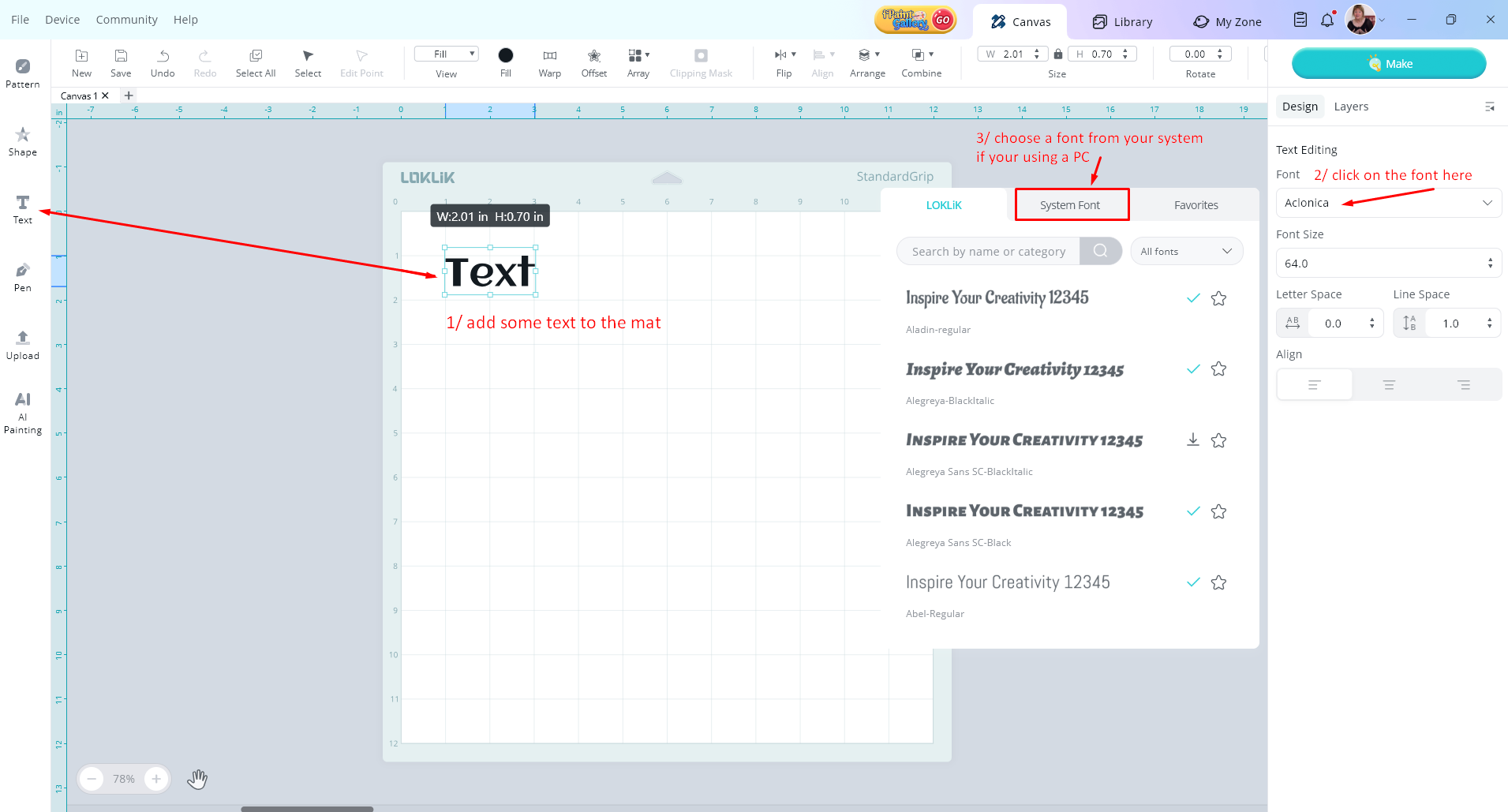
hi @Candace_Wilkerson you can find extra fonts to add to your PC like @Samantha_Bryant has shown you, and if you are looking for how to find them on the design canvas in LLiS heres how on this screenshot, the LOKLiK ones are showing on the list atm and if you click on the System Font button all the fonts that are installed on your PC will be available for you to use (but you can’t share system fonts with the community, they only for you to use)
2 Likes
I’m on iOS and I have the iFont app, but my phone won’t recognize the certificate so I can import the fonts from the app. Any suggestions there?
3 Likes
Yeah, it sounds like the same issue I have with Android. I don’t think there’s a way to download new system fonts with mobile. I’ve tried every way possible. I’ve downloaded the fonts from the websites I mentioned above, but they don’t show up in my phone. I’ve downloaded fonts from the Samsung store and they don’t show up either. I’ve suggested that Loklik add more fonts to their database, recently. Hopefully, they’ll add new ones soon. That would be really awesome, because I like to use my phone and tablet to design. However, the PC software has more capabilities all around, so I mostly design with it. I’d use the mobile more often if they had more fonts.
2 Likes
I use FontCase iPad app and it works very well. I’ve been using it for Affinity and IdeaStudio for over a year.
2 Likes
Idk why I just thought about this, @Candace_Wilkerson, but if you have Canva, or use any other design apps, you can design using their fonts and upload your designs to the Loklik IS. Canva Pro has a lot of nice fonts, and I use it to design quite often. Just be sure to save as transparent SVG — if you have the Pro plan — or you can remove the background and convert to SVG inside the IS.
2 Likes