I have used my engraver successfully on many many projects, but trying to take the lens head out to get it cleaned and I am not sure how
4 Likes
Hi @Tracy_Nation, I’m so glad you are having success with your iEngrave.
You will need an Allen Wrench, Non-Woven cloth, Isopropyl Alcohol Solution.
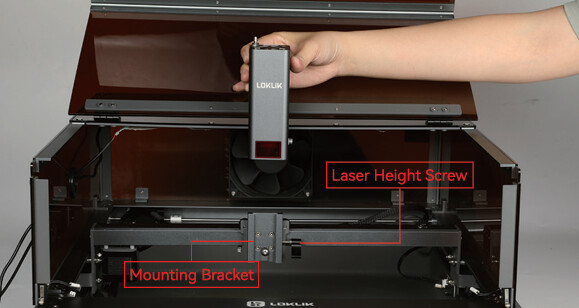
- Remove the connector plug at the top of your laser module.
- While holding on to the laser module untighten the thumb screw keeping it in place.
- Then gently slide the laser module up out of the bracket
- Remove the laser window and air vent pipe
- Dip a non-woven cloth or microfibre cloth in a small amount of isopropyl alcohol (not to wet so the cloth isn’t dripping)
- Use the cloth to gently wipe the laser lens clean
- Reassemble the laser window and air vent pipe back in place.
- And attach the laser module again.



4 Likes
@Tracy_Nation if you follow the steps laid out by @BellethehowtoGuru you will have it cleaned in no time. As a shortcut and if you have them laying around, I use eyeglass wipes to clean all of my laser lenses. They are usually pretreated and a small enough to get down in the tight space of the lens. Please let us know if you have any other questions and happy crafting!
1 Like