when you on the machine its blinking what should ido?
2 Likes
Hi and welcome to the community @Mary_Anne_Perote!
If your Loklik iCraft machine is blinking when you turn it on, here’s what to check:
1. Power Connection: Make sure the power cord is securely plugged in and the outlet is working.
2. Firmware Update: Blinking lights can sometimes mean the machine needs a firmware update. Check the Loklik app or website for instructions.
3. Bluetooth Pairing: If it’s trying to connect via Bluetooth, blinking may indicate it’s in pairing mode. Open the Loklik Studio app and try connecting.
4. Error Indicator: If the blinking is rapid or unusual, it might signal an error. Try turning the machine off, waiting 10 seconds, and turning it back on.
5. Support Needed: If it keeps blinking and won’t respond, contact Loklik support or check their FAQ for your model.
Let me know what kind of blinking you’re seeing—slow, fast, steady, or flashing in a pattern—and we can help narrow it down!
the blink is fast and nonstop
 What Fast, Continuous Blinking Might Mean
Here are the most common causes and what to do:
•  Power or Startup Error
Try unplugging the machine completely, wait 10 seconds, then plug it back in and restart. This resets the system and may clear the blinking.
•  Bluetooth Pairing Issue
If the machine is trying to connect via Bluetooth but can’t find a device, it may blink rapidly.
Open the Loklik Studio app and check if the machine appears under connected devices. If not, try pairing again manually.
•  Firmware Glitch or Update Needed
A nonstop blink could mean the firmware didn’t load properly.
Check the Loklik Studio app or website for firmware updates. Reinstalling or updating the app may help trigger a proper connection.
•  Hardware or Internal Error
If none of the above work, the blinking may signal a deeper issue.
Contact Loklik support or refer to the LOKLiK iCraft™ User Manual for troubleshooting steps.
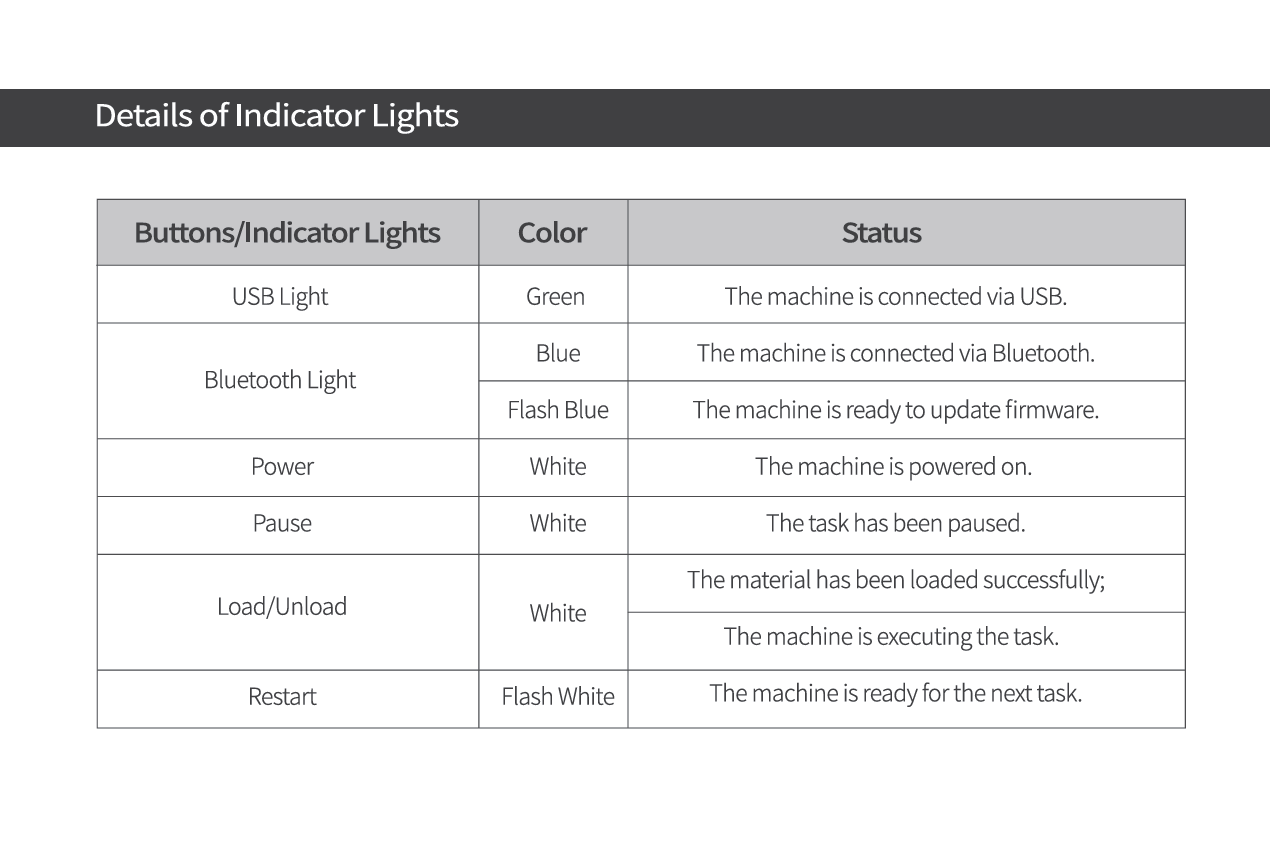
Hope this troubleshooting guidelines helps! Please keep us updated!
whenI tried to open the machine it blinks and no
other than that no lights of bluetooth and usb just blinking and also the blue laser is blinking

It looks like your machine needs a firmware update.
Bluetooth won’t work for this—please connect your Loklik iCraft to your computer using a USB cable, then follow the on-screen instructions to complete the update.
1 Like