LOKLiK vs. Others vs. LOKLIK | Cutting Force Conversion Charts

Since this topic involves materials, software, and hardware, please feel free to move it to a more appropriate category.

Here I go…

Maintaining two different cutting force scales for LOKLiK and other materials hasn’t been the most comfortable idea for us crafters. It’s been a real handicap to deal with. I’d love to see this undone one day so that we only have to manage a single scale — ideally, a standard one for all LOKLiK machines, since the iCraft already uses a slightly different scale.

In the meantime, I ended up calculating some conversion factors so I can convert both ways and make databases and annotations easier. This is also part of an attempt to use the iCraft material parameter list on the Crafter.

I’d like to share the conversion factors with you. I’ve put them in an Excel file with two sheets. This first one is a bidirectional converter: LOKLiK → Other / Other → LOKLiK.

imagen|571x500

Here, you’ll find the different scales converted to one another, along with the function used to calculate the conversion.

The other sheet is a bidirectional conversion calculator for Crafter ↔ iCraft. In my opinion, this one is less reliable, as the main difference with iCraft seems to be that it performs better in more demanding cutting conditions. Based on my tests, I’ve identified three approximate conversion ranges:

  • 1.07 for vinyls
  • 1.5 for thin materials
  • 1.2 for cardstocks and tougher materials

Please note that the annotations and formulas are in Spanish, but I think they’re easy to understand, as most of the terms come from our shared Latin roots.

11 Likes

The LOKLiK iCraft has a greater cutting force than the Crafter does. In saying that everyone’s machine is different though. A setting that works for you to cut vinyl may not work for someone else. Doing test cuts are essential when working with a new material to get the right settings for that material and your machine.

8 Likes

I want to add to @BellethehowtoGuru the materials also play q big role not all the vinyl comes in the same thickness for example

7 Likes

I agree, they are not universally made, that’s why it’s advisable to do trial and error in every machine :smiling_face_with_three_hearts:

7 Likes

I agree with you all. Please take this only as a first contact conversion factor of the provided material parameters lists provided by loklik and as an extra support for each one’s tests xd

6 Likes

Asi es, yo corto vinipiel con grosor desde 0.4mm a 0.8mm con mi loklik crafter, usando la configuracion de cartulina con los parametros del sistema y no tengo problema, rara vez he tenido que modificar la fuerza o la velocidad, y caso todo lo corta en pasada, loklik es una maravilla <3

6 Likes

I don’t have any settings below 300+ that will even cut. so when they say 6.5 - that really isn’t an option.

4 Likes

when it tells you to use 6.5 force - then it won’t cut. then try 650 and it just rips the material. no clue how to cut using this machine

5 Likes

1st which machine version are you using?
2nd what material are you trying to cut? There are presets in the machine you can choose from and from there you can adjust accordingly.
You can also try the cutting force calibration to recalibrate the force of your machine

5 Likes

Timmy is right, we need to know which is your machine.

I think it is the Crafter, as you’re talking about 650.

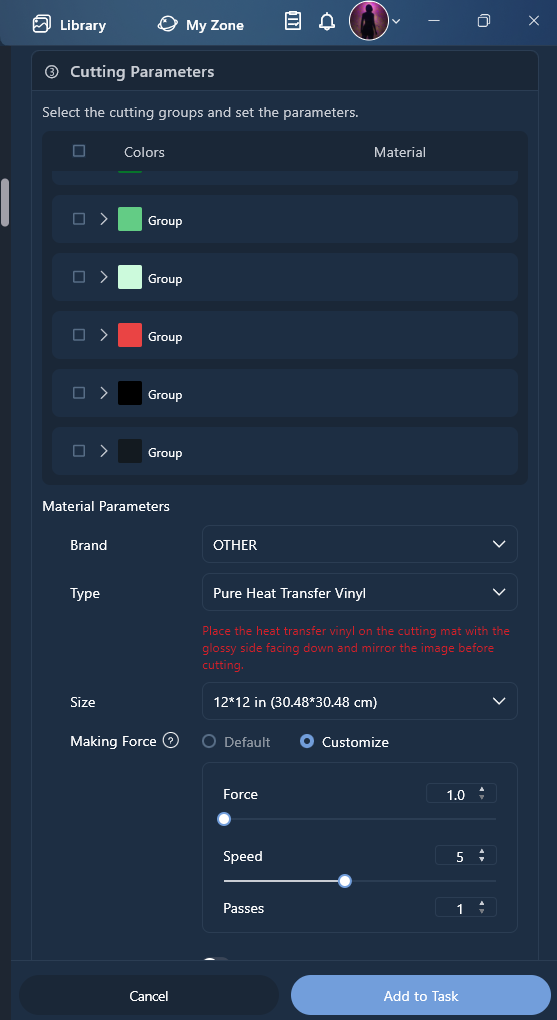
That can only be in the “Other” material scale of the Crafter which goes from 100 to 800.

Please notice there are two scales in the Crafter, that’s the reason why of those conversion tables.

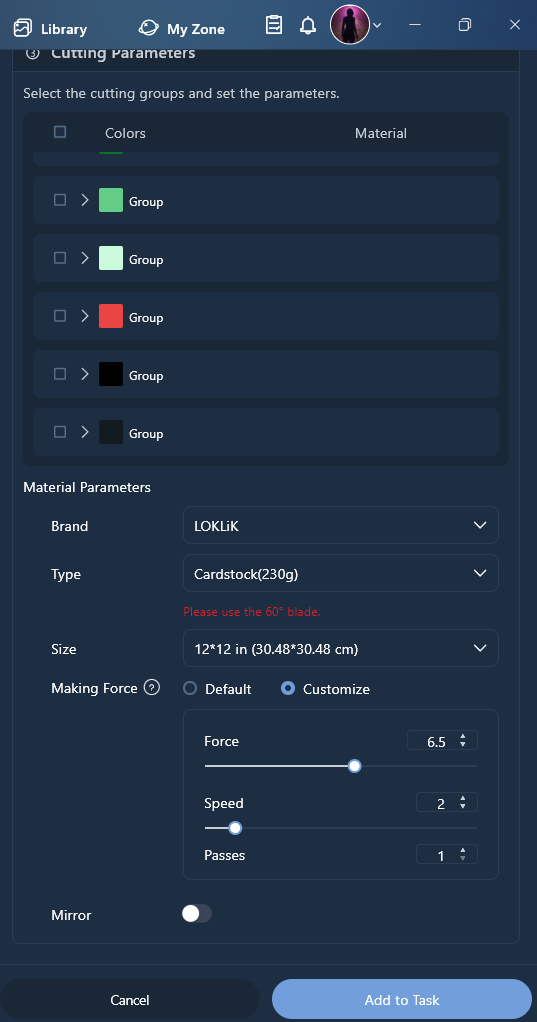
Loklik material and scale: 1 to 11
Other material: 100 to 800

So please, if you say you cannot select 6.5, please be sure you’re selecting a Loklik material too.

And Timmy is right again when she says you may need a cutting calibration, which calibrates the cutting force.

5 Likes

If you use Default, you cannot customize the cutting force:

If you choose Brand > Loklik / HTV Ront and “Customize”, you can set force from 1 to 11

If you choose Brand > Other, Customize is the only option and you can set force in a 100 - 1000 scale

5 Likes

I forgot to mention the customize part. Thank you for mentioning that :smiling_face_with_three_hearts:

4 Likes

I noticed how the settings in idea Studio nearly all say a single pass. Most of the vinyl I have says two passes.

My last machine also had adjustable blade height, which the iCraft does not.

I would love a material test option - so you can cut a series of test patterns on a new material at different settings to get the best settings.

4 Likes

The vinyls you have says two passes? That’s not nice.

About the blade heigth. Maybe is my ignorance but it seems nice not having to deal with another parameter. I don’t know, maybe it’s useful, but I guess is better if not needed, isn’t it?

4 Likes

This is the instructions from my newest roll of HTVRONT self adhesive vinyl.

For the other makes of cutting machine it clearly says 2 passes.
LOKLIK settings are not included.

I think I will try a test piece with both 1 and 2 passes, unless HTVRONT and LOKLIK have some guidance.

3 Likes

Testing Results.

Test material HTVRONT Tomato Red plastic backed permanent Vinyl.

Test 1 Default Idea Studio setting:
· Force 6.4
· Speed 5
· Passes 1
Result:
Very hard to weed.
Cuts the vinyl but not the glue layer.
Narrow corners tear, small areas and holes not separating – coming away with the waste.
Text was a complete failure.

Test 2 Default Idea Studio setting – two passes:
· Force 6.4
· Speed 5
· Passes 2
Result:
Very easy to weed
Small areas and holes easily separating.
Text was easy to weed.
Can see score lines in backing sheet.

Test 3 Default Idea Studio setting – Higher force 6.7
· Force 6.7
· Speed 5
· Passes 1
Result:
All weeded fine.
Cuts the vinyl and the glue layer. No marks on backing sheet.
Narrow points could pull away, probably my weeding technique.

Test 4 Default Idea Studio setting – Higher force 7.4
· Force 7.4
· Speed 5
· Passes 1
Result:
Weeded fine.
Cut lines seen on the backing sheet.

My weeding was rushed, the heart needed the inner part removing first!

Conclusion.

With this particular vinyl in future I will probably opt for the settings in test 3.

Using the upper value of the suggested pressure range.

· Force 6.7
· Speed 5
· Passes 1

30 minutes well spent.

5 Likes

I agree - Adjusting both height and pressure does not make a lot of sense, unless you are seeking to cut down to s specific depth.
We need enough pressure to cut the vinyl (and the glue) but not the backing sheet.

4 Likes

Yes, that’s what I would do too. Higher force, only one pass and maybe a little bit slower. I mean I prefer only one pass, higher force and slow it to avoid dragging or any problem.

At the end the best thing is performing your own test :ok_hand:t2:

2 Likes

any chance your xcel sheet is downloadable? thanks! still playing with settings. I have a Silhouette Cameo and it does give setting information but it only talks about the ‘blade’. It would be interesting to find out which ‘blade’ settings equal what blade to use in the LOKLIK crafter. For example: blade 1-5 may be fine point, 5-10 might be medium, and above that? a deep cut blade?
I am full of questions and apologize for that. sadly it’s just my nature to know as much as possible about anything I get involved in. LOL

1 Like

It’s not possible posting other than pictures here, but you have the formulas I made writen so that you can see them. Check the images and you’ll find them with the conversion values.

Anyways they are from Loklik to Other and viceversa in Crafter and Crafter to iCraft, there’s no way you can obtain Silhouette’s parameters from them.

Maybe you that have both, can produce that conversion chart and share for those which also have both.

This post have particular interest for Loklik’s Crafter owners, as we are under particular scales than after that version dissappeared. But it can be expanded to other models conversion charts xdd

2 Likes