I’m trying to create my first test project with the app and when I follow the instructions to press the “origin” button the laser head moves to the top right corner and tries to keep going, causing the machine to make a terrible noise, as if there is no limiter up there. How do I set the original origin on this machine so it stops trying to go way past the zero, zero point?
Even after it settles down, pressing the frame button makes it shoot way down to the bottom and try to continue even past the limit, causing more issues.
Still have not been able to get this to set up properly. Help!
4 Likes
Hi and welcome to the community @Timothy_Totten! Oh no, that grinding noise is definitely not what you want to hear on your first test run—thank you for describing it so clearly. It sounds like the machine isn’t recognizing its physical limits, which usually means the origin point hasn’t been properly set or the limit switches aren’t being triggered.
Here’s how to get things back on track:
 Resetting the Origin Safely
-
Power Off First: Turn off the machine to prevent further strain.
-
Manually Move the Laser Head: Gently slide the laser head to the bottom-left corner (this is typically the true “home” or origin).
-
Power On and Home: Turn the machine back on and use the app’s “Home” or “Reset Origin” function—this should recalibrate the zero-zero point.
-
Check Limit Switches: If the machine still tries to push past the edges, inspect the limit switches (usually small buttons or sensors at the frame edges). If they’re not clicking or registering, they may need adjustment or cleaning.
Hope it works otherwise, you need to contact support. Please keep us updated!
4 Likes
I can not get the iengrave to return to origin in the app or on the desktop. Can someone help me figure this out? Also every time I go to do a task and I hit start the laser acts like it is going to move but then I in the task progress section is says interrupt. What am I doing wrong?
4 Likes
Hello @Michelle_Cornforth, have a nice welcome to the community!
Maybe this topic will help you.
Origin Not Setting and Machine Makes Terrible Noise
Please, visit the Community Guidelines📚 and make a quick search before creating a new topic to check if your subject has already been covered, thank you and feel yourself at home!
3 Likes
Hi @Timothy_Totten! Just checking in—any luck getting your iEngrave up and running? Please keep us updated! Thanks! 
3 Likes
Hi @Michelle_Cornforth! Any updates at your iEngrave? Please et us know if you need further assistance?
No I did not get it figured out. I am currently in the process of arguing with them about returning it and getting my money back.
1 Like
@rinsky What do you mean use the app’s “home” or “reset origin” function?? Where is this found? I am not seeing it anywhere. Is it within the LokLik idea design app on desktop?
1 Like
Hi and welcome to the community @MelissaSmerker!
You can find the origin/home button in the LOKLiK app on both mobile and desktop version. Please see below:
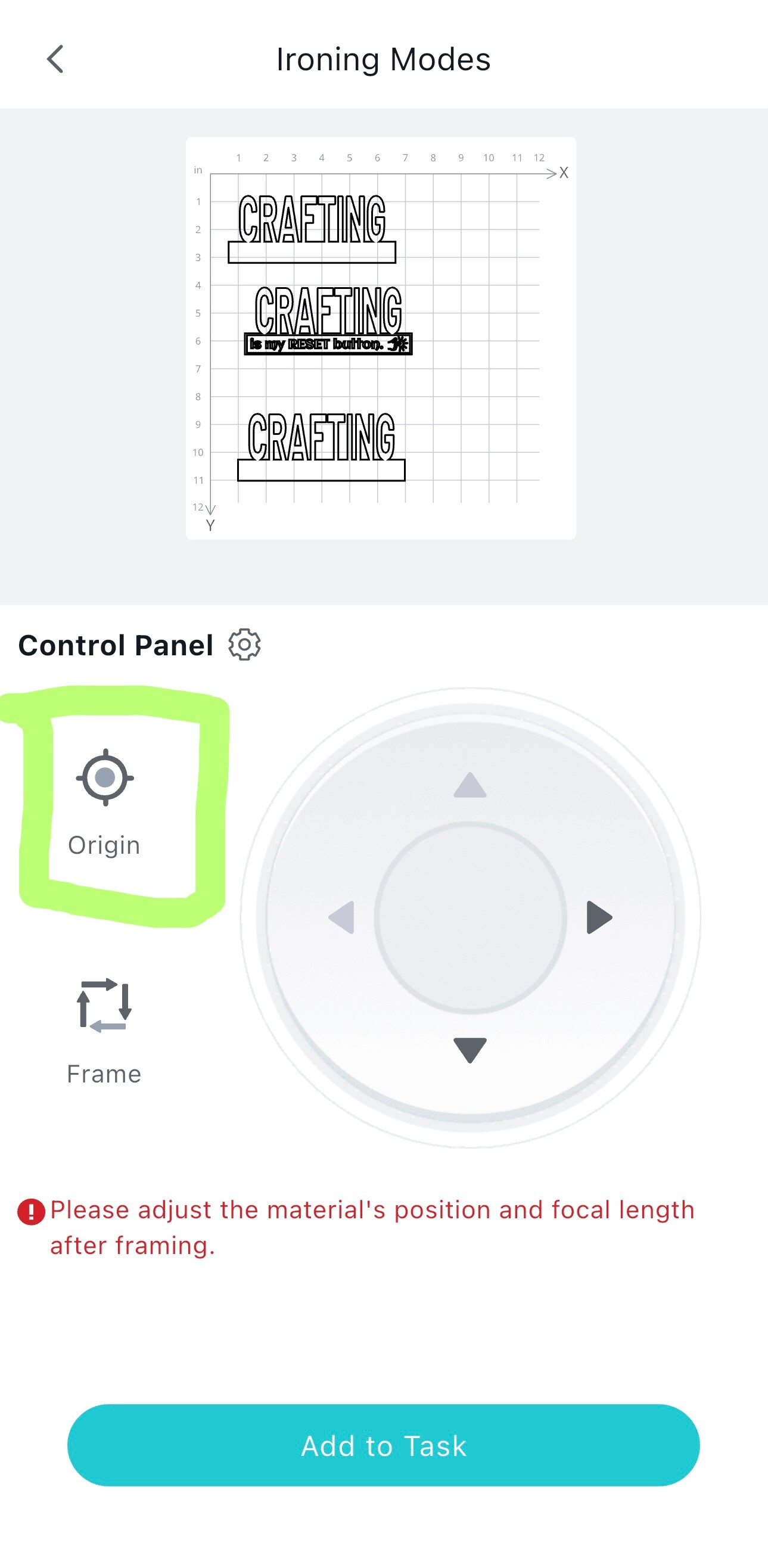
On the other hand, you can find the reset button in the iEngrave itself. Please see the highlighted yellow circle below:

Hope it helps! Please let us know if you need further assistance.