Just started using the D1 printer, and the print is dispensing a lot of white ink
4 Likes
Hello, @ajcladd61 
 welcome to the community! We’re happy you’re here. Congratulations on your new printer!
In order for us to help you, we will need a little more information. Here are some questions I have for you:
Artwork & File Prep
- Is your artwork PNG with a transparent background, or is it a flattened white background?
(It’s the #1 cause of “too much white.” If the background is white in the preview, it will also be white on the print. Use a background remover to make the background transparent. I recommend Canva Pro if you have a subscription.) - Are you using a white underbase setting in the RIP, and if so, which one?
(Some presets lay down very heavy white.) - Does the preview in the RIP show white only where it should be?
(If the preview is wrong, the print will be wrong.)
Printer Behavior
- Is the white ink flooding only in certain areas, or across the whole print?
(Localized = clog or nozzle issue. Entire print = settings.) - Is the white ink thick and pooling, or just heavier than expected?
(Pooling = mechanical/maintenance. Heavy = RIP settings.) - Did this happen on the first print, or did it start after a few prints?
(First print = ink charge or settings. Later = sediment or circulation.)
Maintenance & Ink System
- When was the last time the white ink was shaken or circulated?
(White ink settles fast — titanium dioxide sediment causes over‑dispensing.) - Did you run a nozzle check, and does the white channel look normal?
(Missing nozzles can cause the printer to overcompensate.) - Is the wiper blade or capping station overloaded with white ink?
(If so, it can smear or drip onto the film.)
Film & Environment
- What film are you printing on, and is the coated side facing up?
(Wrong side = ink sits on top and looks like “too much.”) - Is the room humid, dry, or warm?
(White ink behaves differently in extreme conditions.)
If you can answer these questions, it will help us to better understand what’s going on and will allow us to give you the best advice.
1 Like
Hi! I had this happen and had to change the solution setting when you go to print. At the top arrow down to bit 3 or 4 and see if that helps!
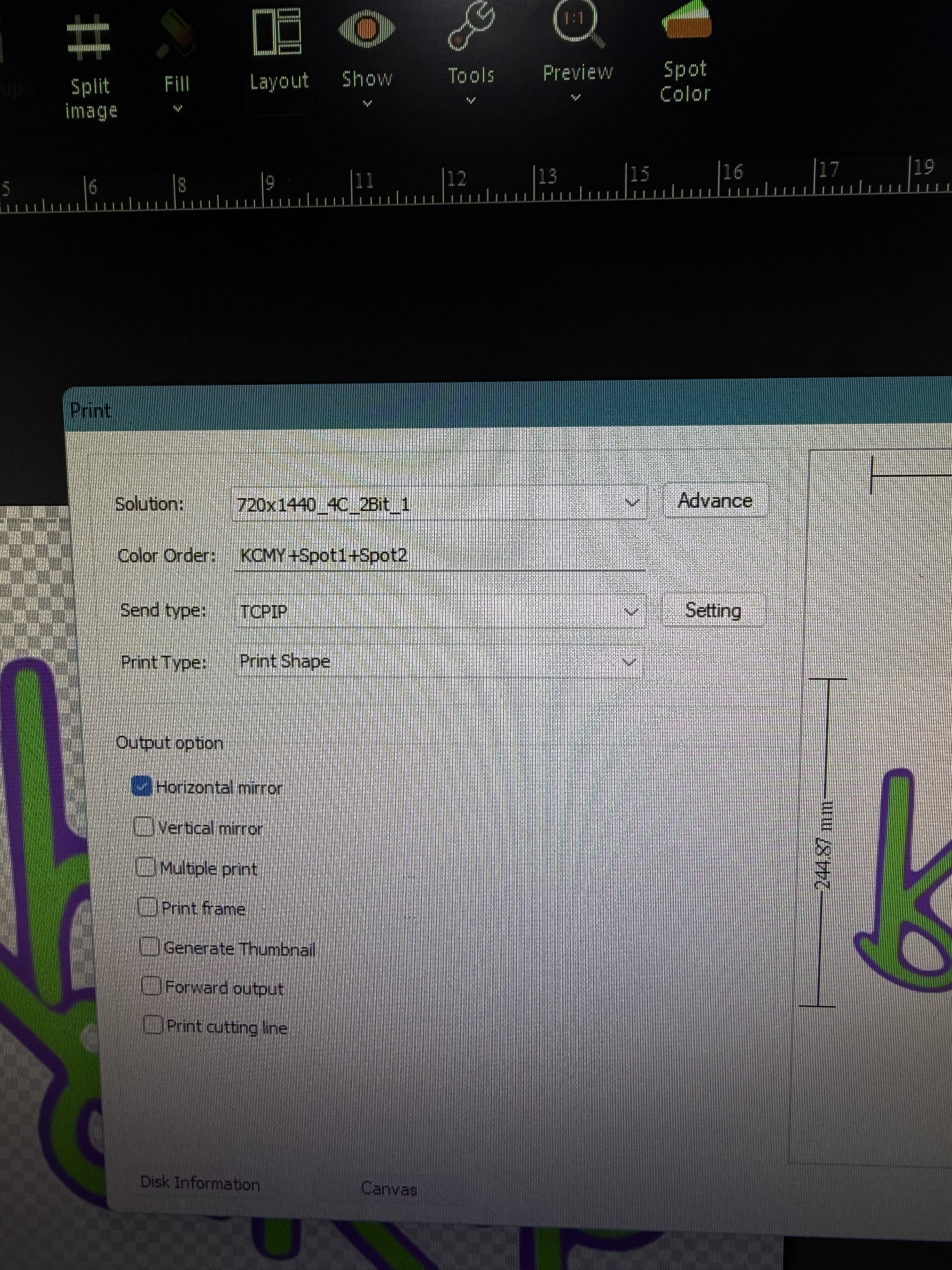
1 Like
What exactly happened though?  To me, “a lot of white ink” is very vague. Just trying to get the full scope of the problem, so that others can also be helped if they come upon this issue of “a lot of white ink” — given that there can be many reasons for this, as I listed above. When you changed these settings, what did it fix? Was there pooling of white ink before you did so, and changing the settings fixed it?
@ajcladd61, if you could elaborate a little more, and/or let us know if any of these tips helped you, it will be helpful for others who may have the same issue you’ve faced. We would very much appreciate it. Thank you. 
When I first got my machine the white ink was pooling on the image and dripping down the page  support told me to change the bit settings and it was all better!
2 Likes
Ok, awesome. Thanks, Lizzie! That bit of information helps a lot.
This is exactly what happened to me also.
1 Like