I just recently received my loklik iEngrave. However I was having problems with the TF card I finally got the software that comes with my machine installed. I don’t want to use light burn or anything else right now. I’m very familiar with cutting machines as I’ve had a cricut for years. It looks similar to their design space. I need to get those configurations from the quick reference guide for the different types of materials. I’m not used to laser machines and the different configurations they use for it. I’m just drawing a blank I’m hoping somebody can help me locate one of the quick reference guides I’m not able to find it on my TF card. Please, thank you so much for all of the help y’all offer
6 Likes
Hi and welcome to the community, @shytown021489! When I first started using the iEngrave, I felt exactly the same way you do now. As far as I know, the only way to view all the materials and their recommended settings is by connecting your machine to your desktop or mobile device through the LOKLiK app. Once you’re connected, you’ll be able to see the full list of materials along with their parameters.
I’m also hoping they release a complete, all‑in‑one list soon. In fact, I’m planning to put one together myself and share it, because I know how helpful it would be for anyone new to the machine.
5 Likes
Please send me a copy of that when you do create it I would love to have one thank you so much
4 Likes
Hello @shytown021489. Welcome to the community and congratulations on your new iEngrave. We’re so glad you’re here. It’s great that you already have experience with cutting machines. That foundation will absolutely help as you transition into working with a laser. It may look similar to design software you’re used to, but the way a laser handles materials is definitely a different mindset at first.
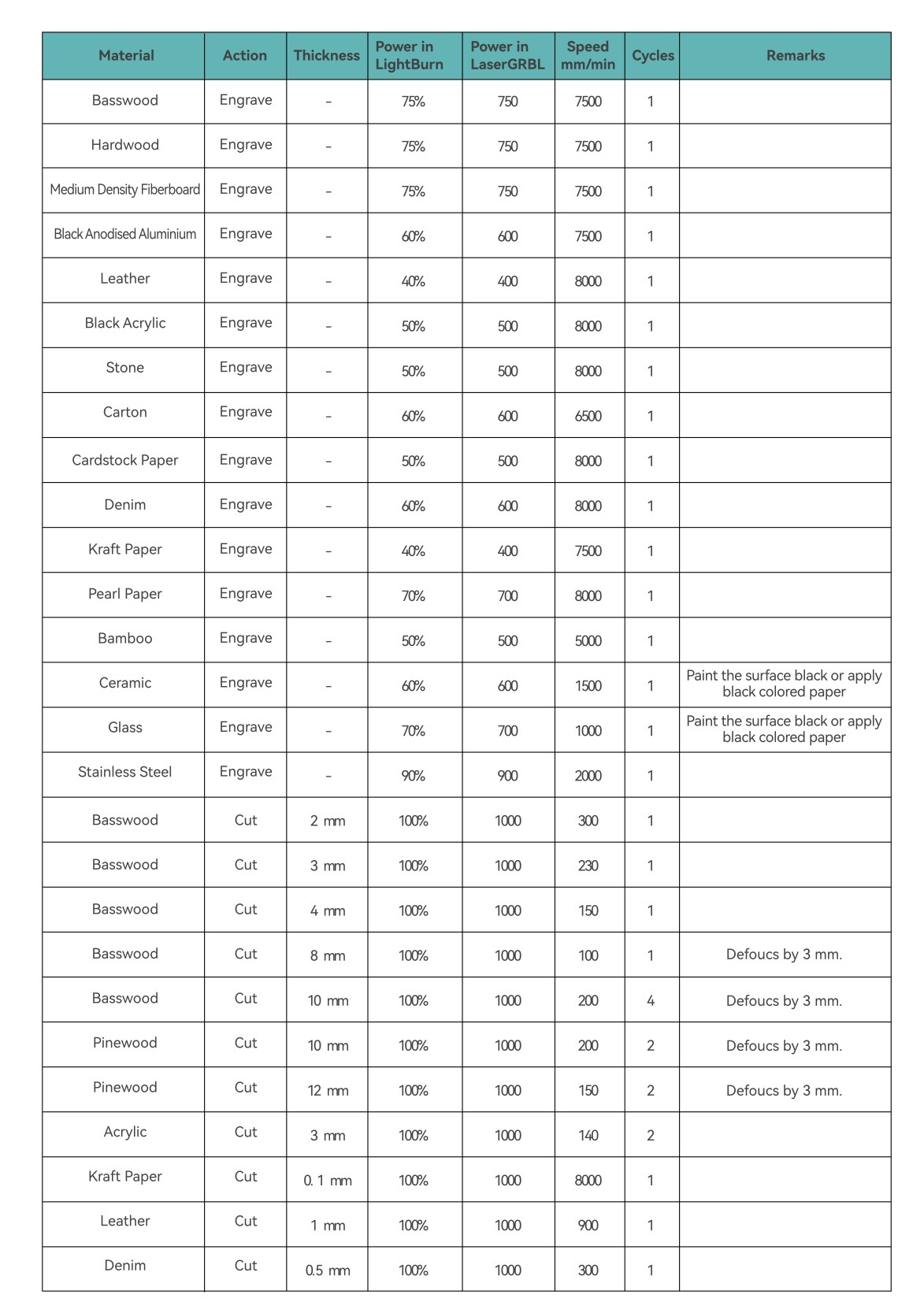
Regarding the quick reference guide for material settings, don’t worry, you’re not alone in feeling a little stuck in the beginning. You will find a material quick reference guide (attached below) on the last page of the two User Manuals of LOKLiK iEngrave PDF’s, one without the cover and one with. You can find them at this link: LOKLiK iEngrave™ Guide. While the settings are listed for LightBurn and LaserGRBL, they will be similar for the LOKLiK Software.
Since you’re new to lasers, here are a few basics that may help while you’re locating the guide:
• Power controls how strong the laser beam is.
• Speed controls how fast the laser moves across the material.
• Passes determine how many times it goes over the same area.
For engraving, you’ll typically use higher speed and lower power. For cutting, you’ll slow the speed down and increase the power, sometimes adding additional passes depending on thickness.
Until you get the official quick reference guide, I strongly recommend running small test grids on scrap material. Create a simple square pattern and vary speed and power in small increments. This helps you visually see what works best for your specific machine and material batch, since even the same material can vary slightly. I find it helpful to remember that not all machines and not all materials are equal, there will always be slight variations.
Also make sure:
• Your focus is set correctly before every job.
• Air assist (if included) is on when cutting.
• You are using proper ventilation and safety precautions.
We’re here to help as you get comfortable with your new machine. Don’t hesitate to ask questions, share screenshots, or post your test results. We cannot wait to see what you create with your laser once you get dialed in. Welcome again.
3 Likes
Thank you for sending over the iEngrave settings. Yes — this is the exact document I’m in the middle of updating, and there’s quite a bit missing from it.
2 Likes
No problem @rinsky. I know I have my little book with all my settings specific to the vendors that I use. So glad you are working on expanding this information. Thanks in advance for that!
2 Likes
Hi there, thank you for posting this guide for configures. I don’t see the column for loklik software idea studio. which column is it in please? Thank you for your help and posts.
3 Likes
Hi @shytown021489! Congratulations on your laser machine. Here is what Cory said about the Loklik IdeaStudio software settings.
I don’t have the laser machine, but if the IdeaStudio has 100% in its laser settings, use the LightBurn settings. If it goes to 1000, use the LaserGRBL settings.
2 Likes
The settings for the IS app and Lightburn software would be the same, as they both have the same speed settings in mm/min and a cut speed measuring in percentage upto 100%. Although the table doesn’t list it separately, the value you use for your IS app is the same.
2 Likes