Hello!!
i got a new printer, which is very specific…it will not print good quality/accurate colors without applying ICC profile (thats how I print via photoshop and colors come out beautifully). However I cannot find that option when initiating print via loklik studio. I know how to get to print setting, where I can chose paper type and size and whatnot, I was even able to dig into SOME sort of color correction (where you have bunch of sliders with saturation, colors etc.) but I cannot find any option to chose/apply ICC profile… googling the problem doesn’t seem to help either
3 Likes
hello @Anna_Smith can you please let us know what printer you are using? inkjet/laser. and confirm if you are wanting to print then cut?
LOKLiK IdeaStudio/LLiS doesn’t currently seem to support selecting an ICC profile for printing inside the app (if it hasn’t been suggested, request color profile support as a feature on this Wishlist post). HTVRONT | LOKLiK Community
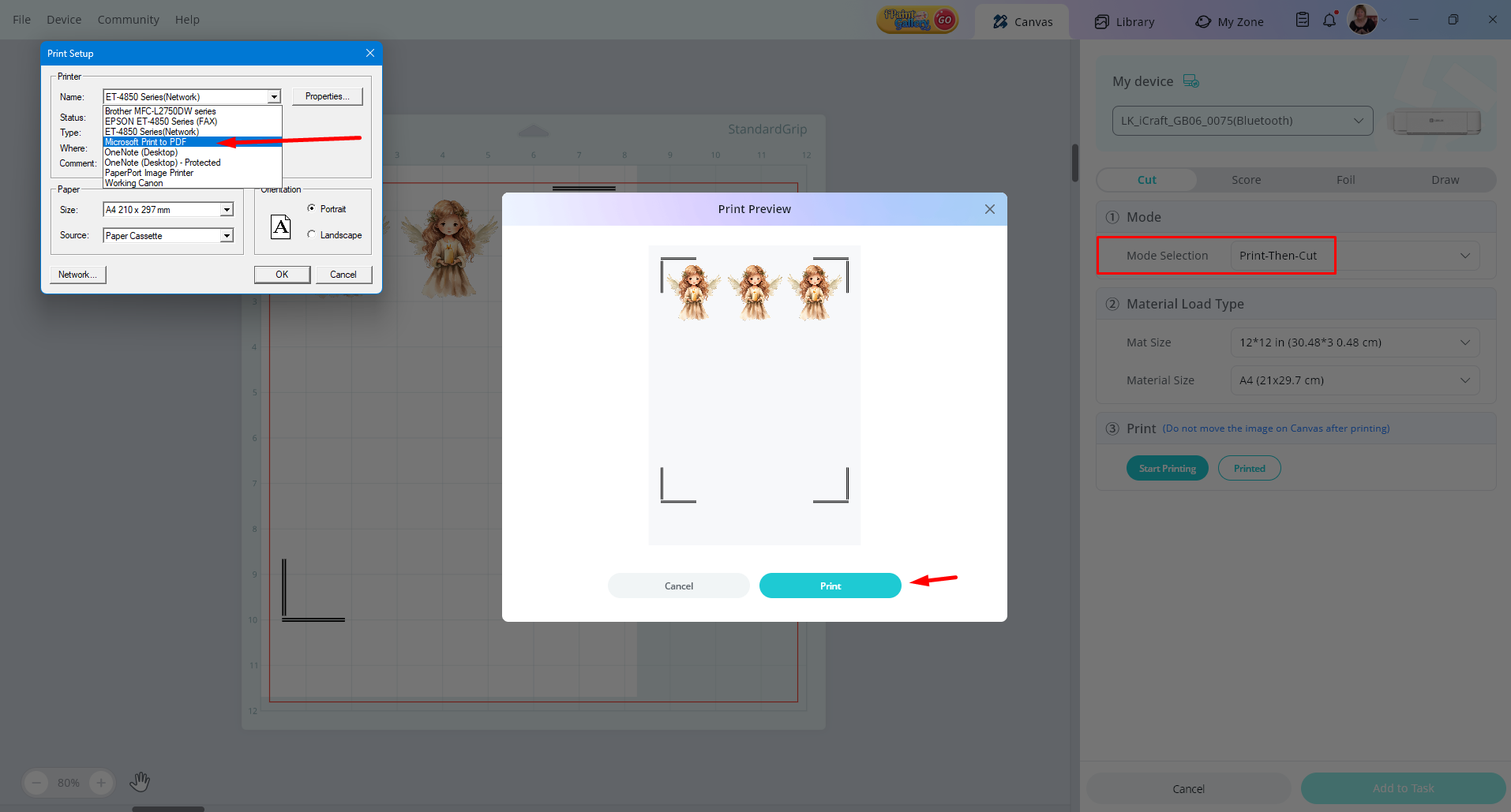
In the meantime, try this workaround: in Print then cut, (have show print border selected) use the print dialog to Save as PDF, instead of your printer, then print that PDF from Photoshop/Acrobat using your ICC workflow.
After printing, go back to IdeaStudio and choose Print then cut > already printed and then cut. HTVRONT | LOKLiK Community
Important: print 100% / actual size, don’t ‘fit to page’, and avoid borderless because it can ruin alignment.
P.S. i havent tried it, but let me know if it works?
2 Likes
Yes, its inkjet, epson ecotank et 8550
Aww its a shame …i hope this feature gets added in the future. I will try your method within the next few days and let you know!!
3 Likes
Hello, Anna 
 Yeah, the best thing I can advise you is to choose the Properties in the printer dialog box and select High/Best Quality. I don’t think there’s a way to choose an ICC profile.
You can try what @InkiteeWorkshop has suggested, and let us know if that worked, as I’m curious to know if it will work.
1 Like
Yeah, printing in highest quality doesnt do anything, neither does chosing different paper setting. For the longest time I could not figure it out. I thought it was my stickers paper fault until I tried to print the same design via photoshop (applying icc) and via loklik studio and the difference is huge. I will try to find some time tomorrow to test it out
3 Likes
Yeah, I figured it probably wouldn’t change anything, but was worth a shot. It (ICC) would definitely be a good addition to the software if they can implement it. Good luck on testing the saving as PDF. I hope that works for you. 
2 Likes
Just an update on trying this method - unfortunately I cannot got it to work  the problem is transporting pdf into photoshop - i tried “open with”, dropping it into PS and also “open as embedded” and every time the picture is slightly moved so the cutting doesnt align. Maybe Im dumb?? Vut I cannot print it aligned exactly as if it came from loklik
1 Like
thats unfortunate @Anna_Smith can you check if you have PSD set to exact size or 100% NOT to fit? other than that I think PSD is dropping the placement off itself???
Yes its set as 100%, just the placement is off… Thank you guys for trying to help tho, my original question has been asnwered 
1 Like
yes, i done a test and PS dropped mine in the wrong place as well, I’ll work on a fix when i can get the time 
1 Like