IdeaStudio & LOKLiK App Update Log | Issue #4 (Version 3.0.0)

Hi Community! :wave:

Version 3.0.0 is here, and it comes with some noticeable changes.

This update centers around a full homepage redesign, along with broader workflow optimizations and a set of new features. The focus this time is clarity and efficiency, making everyday design tasks easier to access and smoother to complete, whether you’re on desktop or app.

Here’s what’s new :point_down:


:desktop_computer: IdeaStudio Desktop

Refreshed UI and Homepage Layout

The homepage has been fully redesigned, with the canvas layout reorganized so core tools are easier to reach at a glance and common actions take fewer steps.
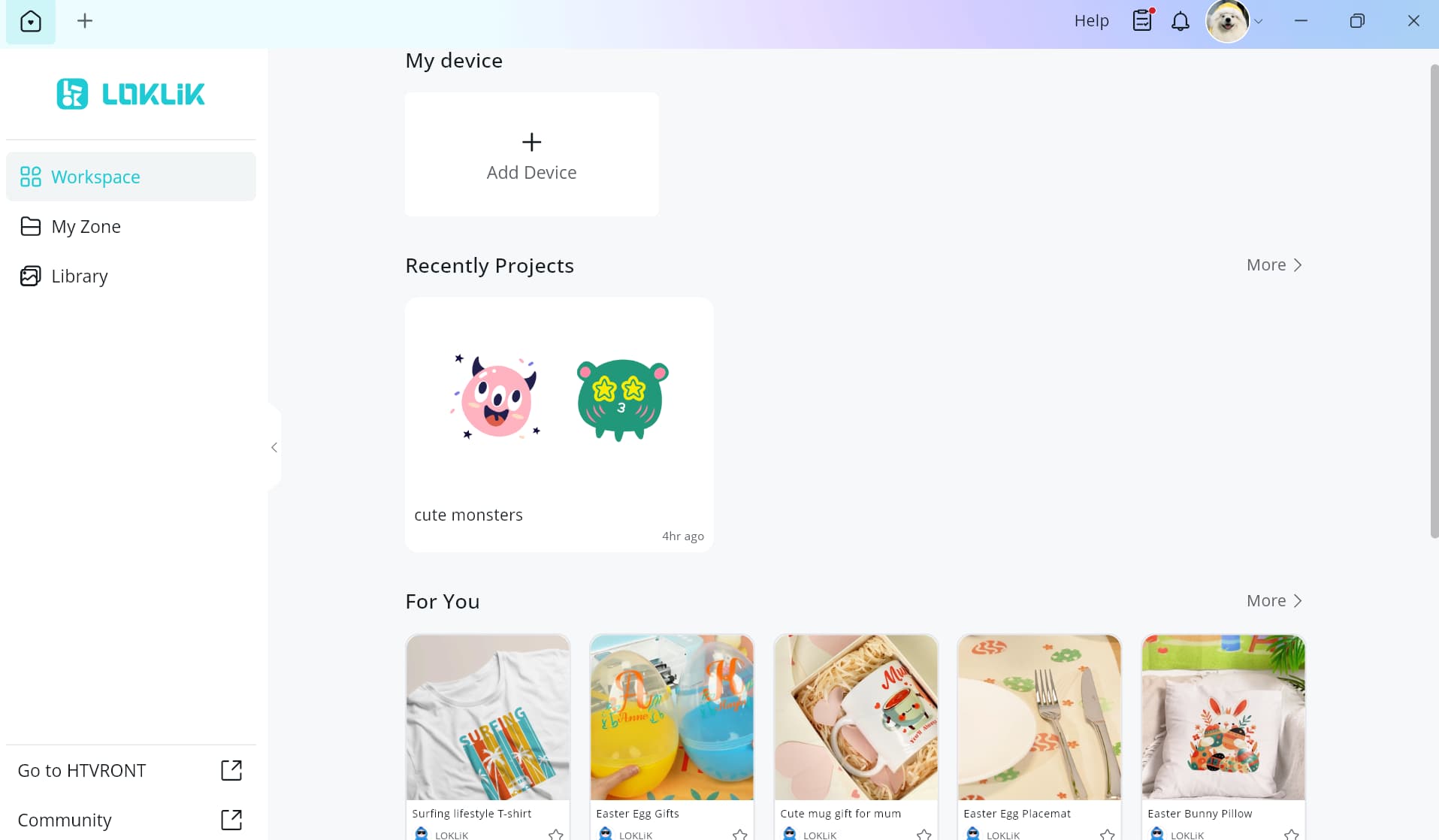
Unified Device Management

All device-related actions are now grouped into a single entry point, reducing window switching and making device management more efficient.
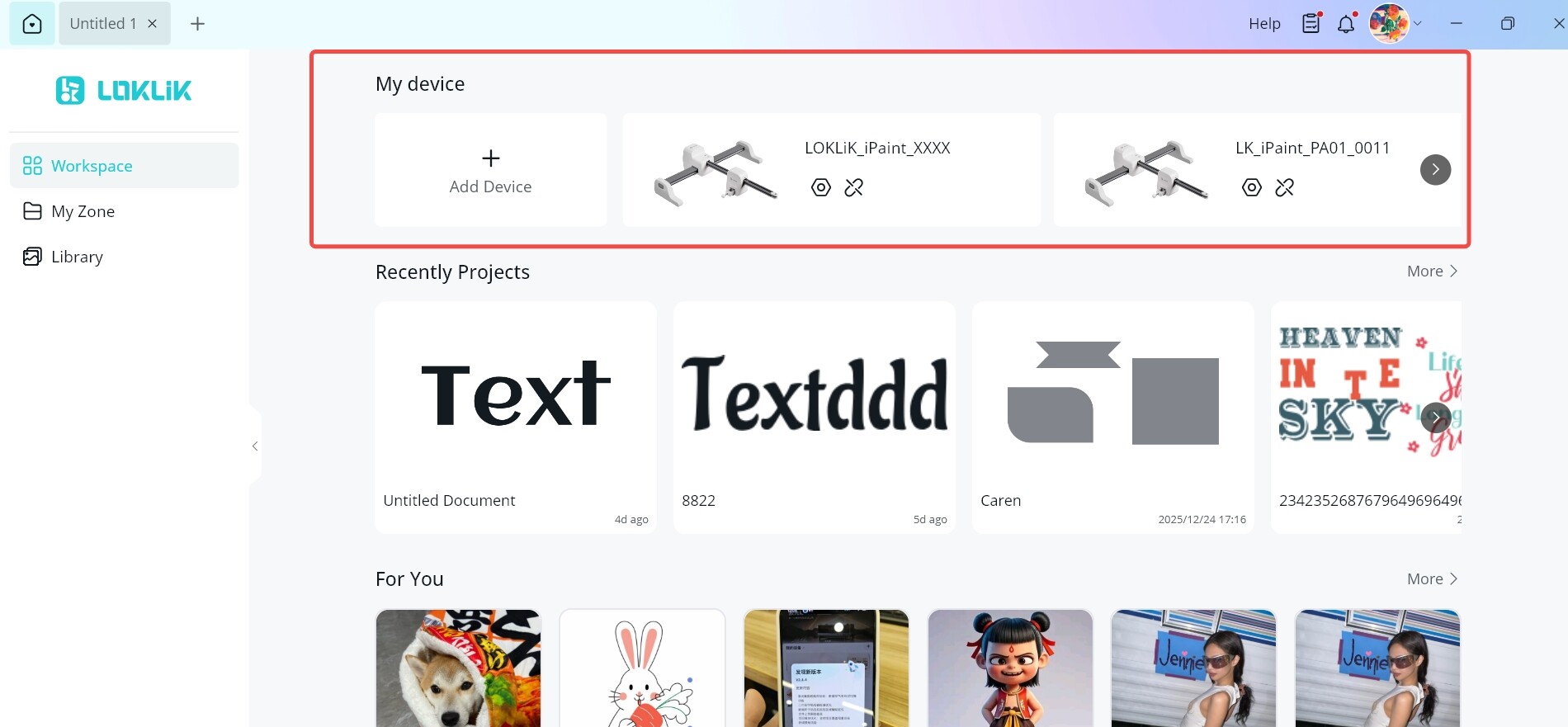

Canvas Layout Improvements

  • Library and My Zone are now accessible directly from the canvas.
  • Design size and color controls have been moved to the right side for quicker adjustments while designing.
User Space Optimization

  • Files can now be saved directly to the root directory.
  • A list view mode is available for clearer browsing.
  • Supports multi-select actions, helping speed up file management.

:iphone: LOKLiK App

Unified Device Management

Device management has been streamlined to align with the desktop experience.

Canvas Layout Improvements

The canvas layout has been adjusted to make commonly used features easier to reach during design.

Community Notifications

Likes, comments, and replies from the community will now trigger in-app notifications, so you won’t miss interactions while using the app.

New Trash Bin

Deleted projects are now kept in the Trash Bin for up to 30 days, offering a bit more peace of mind.


:crystal_ball: What’s Coming Next

A few things already on the roadmap and gradually taking shape:

  • Gradient fills, for more flexible color styling
  • Curved Text, allowing text to be curved upward or downward along a circular arc
  • One-click unit switching in the top-left corner of the canvas
    (based on direct community feedback!)
  • New cutting workflows, including layer stacking, extraction, and line art tracing

That’s it for Version 3.0.0 for now.
More refinements are already in the works, including ideas that came straight from your feedback. Take some time to try the new layout, and let us know what catches your eye or what you’re hoping for next :smile:

23 Likes

Thanks for the update.

So happy that easy unit switching is coming back, and I’m excited for the gradient tools.

Playtime! :star_struck:

12 Likes

Excited to try the new features :smiling_face_with_three_hearts:

12 Likes

It all look really good. I’d add and underline that now we can move projects among folders :clap:t2:

13 Likes

amazing updates! thank you

12 Likes

It should be fine once you get used to the new look. Right now I think it’s become harder to find your way around.

11 Likes

Awesome! Can’t wait to update and play! Thanks for the update, @OliviaZzz! :heart:

10 Likes

Wow awesome update. I’m glad I didn’t release my new beginner guide yet, I’ll have re record some stuff for it.

12 Likes

Awesome! Thanks for the update! :sparkling_heart:

11 Likes

Thank you for the update! Just a quick question, is the following addressing using multiple iCrafts at 1 time?

I have 2 iCrafts and it would be beneficial to be able to send tasks to multiple machines to allow us to finish up large projects.

10 Likes

Thanks for the great updates to the IdeaStudio @OliviaZzz. Cannot wait to try out some of the new features!

9 Likes

No, I’m pretty sure the unit switching is changing the measurement units of the canvas from millimeters to inches with one click. However, I agree, it would be nice to be able to use 2 machines at once.

8 Likes

Oh that makes sense, thanks for clarifying, thank you. I would like for the app to allow us to use 2 machines at once. That is very helpful with large orders where I can run other cutting machines all at the same time and cut my cutting time.

7 Likes

You’re very welcome. :heart: Yes, I think it would be very helpful, as well, to be able to run 2 machines at once. Hopefully, they’ll make that an option in the future.

8 Likes

Where can I find the update for my icraft?

8 Likes

Hello, @Nancy_Sierchio :wave::smiley: It’s a software update, not a firmware update, so you’re not updating your machine, just the IdeaStudio. In order to do so, you just open the software, click the notification bell in the top right corner, and there will be an update available. :heart:

8 Likes

I don’t have two machines yet, just the original crafter and they had said you could use multiple machines, at a time. can’t you just start a new canvas and assign it to another machine and follow steps as usual?

8 Likes

Hi, @Lesli :wave::smiley: Welcome to the community! We’re happy you’re here. No, it’s not possible to connect 2 cutting machines at the same time, as of now. Only one machine can be connected at once. The IdeaStudio is able to design for several different machines, such as the iEngrave, iPaint, Tumbler and Phone Case heat presses, but you can’t connect 2 cutting machines at once. It’s probably because of the Bluetooth only being able to handle one machine at a time, so while it would be nice, I doubt it will ever be possible.

7 Likes

That’s Interesting to know. Thanks!

8 Likes

You’re most welcome. I could be wrong about the Bluetooth though, and do hope that they can eventually find a way to do it. I just did some research and found that other brands allow for multiple machines cutting at once, for industrial use, but it does require some extra stuff/workarounds, like a USB splitter is one way they connect multiple machines. So, maybe, it would be possible if we connect with USB, in the future, if the Bluetooth option isn’t possible.

8 Likes