Uh, that would be a good option for sure. I will need to give it a try! Thank you!
8 Likes
That’s a good idea! Never thought of doing that 
 . It’s something I have on my embroidery software and it’s so useful for choosing what colours to use.
9 Likes
Yeah, it does sound like a great feature to have. The square works just fine for me, because I can also use it to align/center the design and see how it would look on the blank. This really helps when I’m using a 12x12 in canvas as a blank, as I can align it, then mark exactly where the design would go on my canvas blank using the measurements around the IS canvas. 
9 Likes
Love this New updates! 
 Thanks!!!
8 Likes
Hey, @Nancy_Sierchio, I was just thinking… If you want to get the update quicker, you could always uninstall the software from your computer, then, go re-install it from the HTVRONT website, as it would automatically install the latest version (v. 3.0.0). All of your projects will still be there, as long as you login with the same username and password you’ve been using.
7 Likes
Hi @Nancy_Sierchio, did you get LOKLiK to update?
The notification bell is here
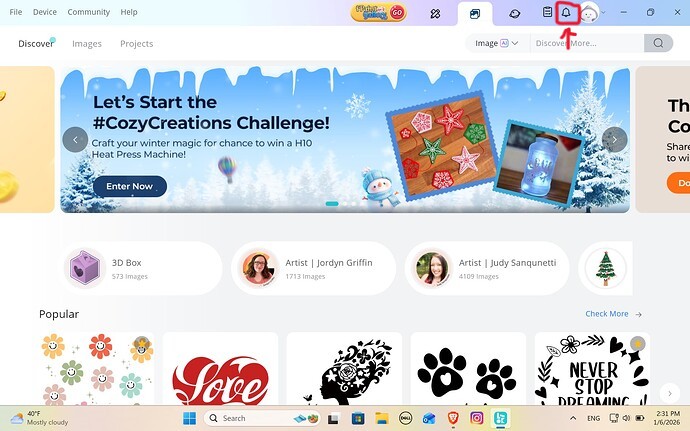
After you click on the bell you should find an update message on the top of System Notifications
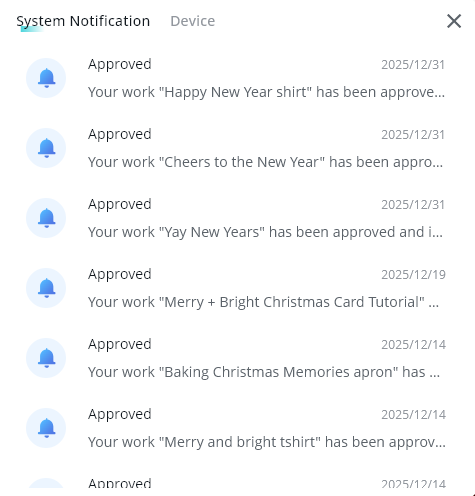
If you don’t see a update there, you can check for updates by going to the help tab.
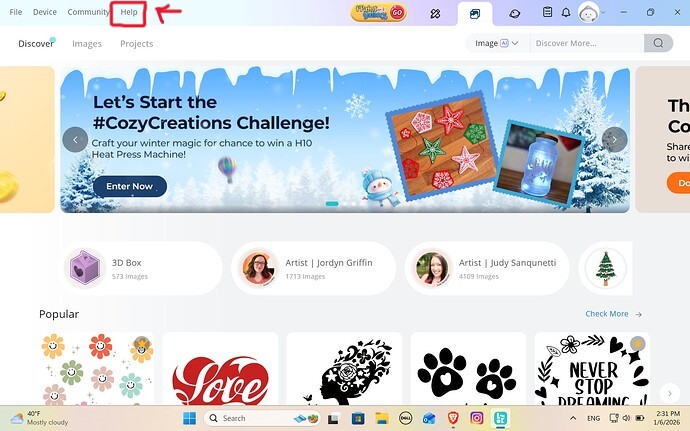
Then click on About Idea Studio down the bottom
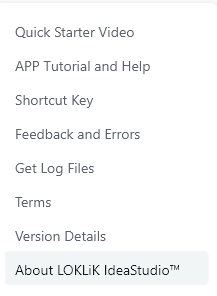
Then click check for updates

Depending how old your version is, you may need to uninstall and reinstall the new version here from the website as @Samantha_Bryant suggested as auto updates were bugged in previous versions.
10 Likes
She definitely knows where the notification bell is, but I completely forgot about the check for updates option. I never need to do that, as it’s always popped up in my notifications.
7 Likes
Awesome updates!
8 Likes
There’s also a v8 firmware update
8 Likes
In Help > about software > check updates
8 Likes
Thank you for removing the arrow button to see the other tools. I appreciate the update.
8 Likes
Oh, ok. That must be for the iCraft, I just have the Crafter, so I didn’t know about that. Thanks for the info.
7 Likes
Haven’t opened my crafter in a looooooong time 
6 Likes
I hope in the next update the editing of the “nodes” can be fixed. They’re too close together even when fully zoomed in and when you want to remove only one node, the whole contour gets deleted. I hope there will be more tools in manipulating the nodes to edit the contours  @admin
8 Likes
“Grateful for this beautiful Loklik community & shout out to @OliviaZzz  — thank you for keeping us informed and up to date on the changes with our machines. Your generosity, knowledge, and support help us create with intention and excellence every day
  .
.
8 Likes
NB
There’s a few issues I’ve noticed with the iPad/iPhone version of the LOKLiK app:
- Undo/Redo is skipping steps. This means that some destructive edits can become permanent.
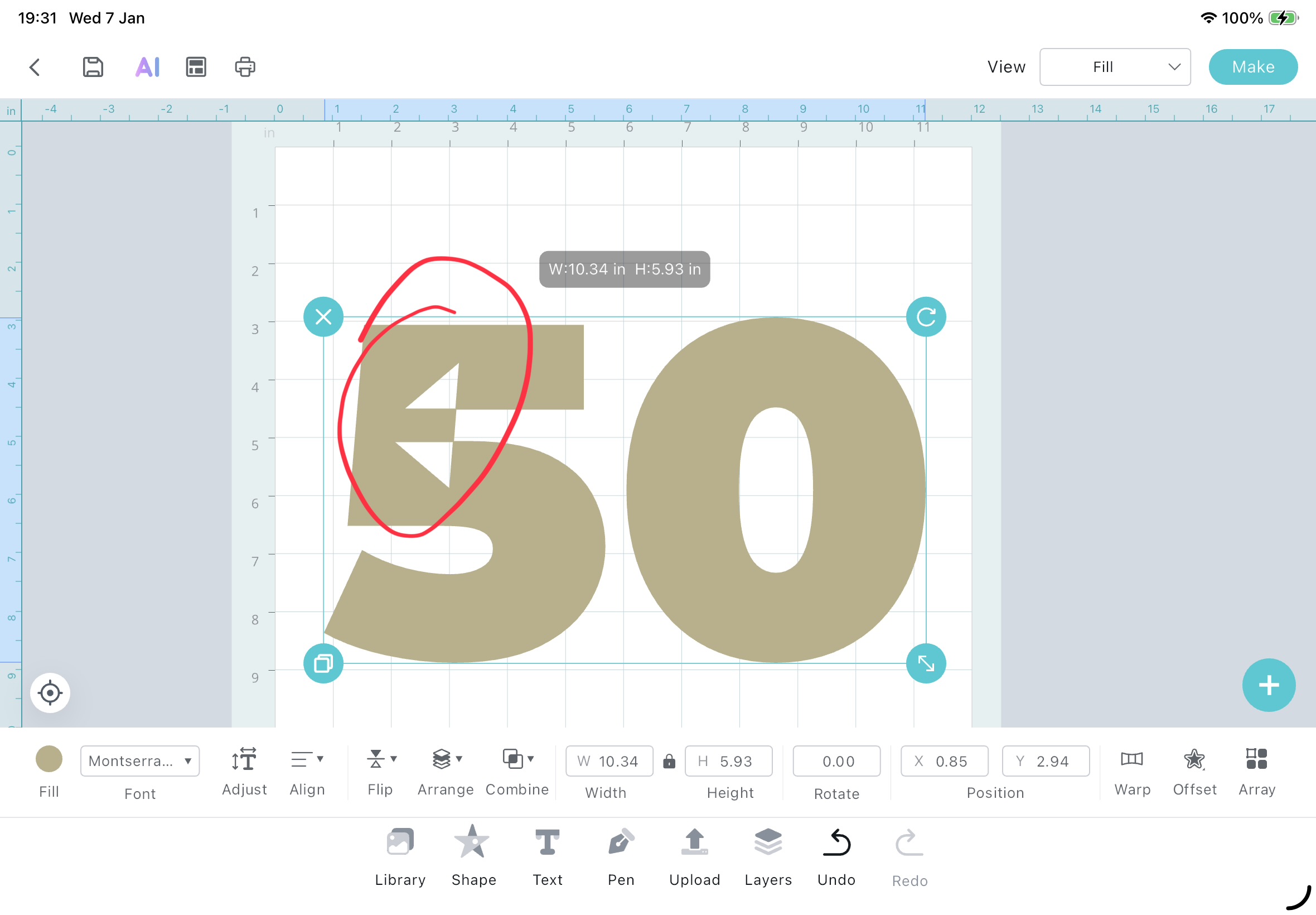
- Some fonts have errors and are not rendered correctly.
- Selecting some actions is often unresponsive and can take many clicks to work, eg. Save, Make, Padlock.
- Feedback only shows Devices, there’s no Software option.
Please ensure you save your projects regularly, so you can revert to a previous revision if you encounter a permanent error.
@admin
8 Likes
You have to go to Help > About
Oops: I see Belle already told you
8 Likes
The font issue has carried over from the previous update. At the moment a work around for this is to select the font, then select combine, then select Subtract Crossover. This will combine it all together so it cuts correctly. Please note after you do this, it is no longer considered a text box but an object and the text is not editable anymore. You will need to create a new Text box to change the word.
Hopefully this and the other things you mentioned gets patched quickly.
8 Likes
If you Combine > Subtract Crossover, does it remove the white marks in the 5? This is something that happens even in Affinity and if I bring text from Canva, so it’s not just an IdeaStudio thing. And, yes, the PC software’s Undo will skip steps, too. Mainly after doing Combine > Unite or Subtract. I had to send them feedback, because I was losing my projects after I made them. I would return to the canvas after making my cuts, and my whole project would be gone. So, I learned to save before clicking Make.
On a separate note, I would like for the Combine options to work after warping elements. Once something has been warped, all Combine options are grey. 
Update: you can use the Combine tools, it just appears as if you didn’t do anything while in Fill View. If you choose Contour View, you’ll see the slice or subtract action that you made. I’ve also found, that it just depends on what shape or pattern you’re using. 
7 Likes
I’m about ready to throw this machine out the window! I uninstalled the software but when I go to reinstall it doesn’t say download it says install on more devices & when I click on that it states no available devices for app to install. What am I doing wrong?
7 Likes